How to Build a VR App for Meta VR Glasses with React Native
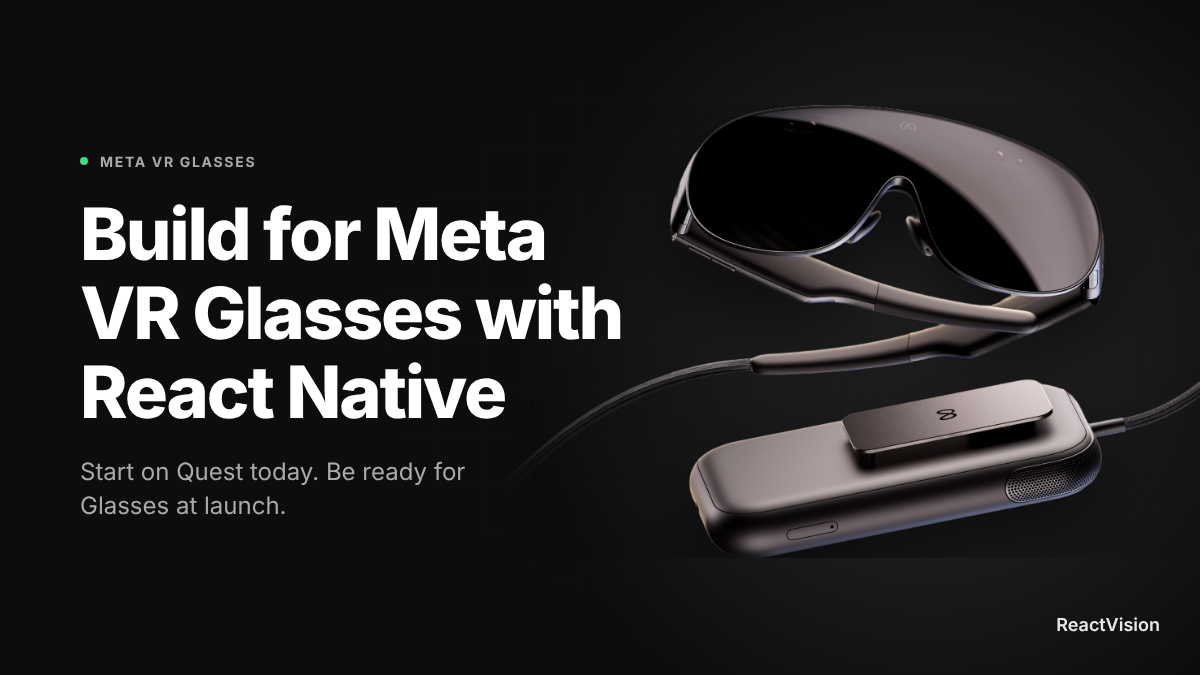
Meta VR Glasses don't ship until Spring 2027, but you can start building for them today. If your team writes React Native, the route in is shorter than you might expect: build for Meta Quest now, and that same app becomes the foundation for Glasses.
This guide covers what Meta has actually said about developing for the device, what changes when you design for it, and how to get a VR app running on Horizon OS with React Native, Expo and ViroReact.
The short answer
Yes, you can build Meta VR Glasses apps with React Native. Meta VR Glasses run Meta Horizon OS, the same operating system as Meta Quest, with the same SDKs, and Meta says one app can target both devices. Build your app for Quest today with ViroReact and Expo, design for hands and eyes first, and you're building for Glasses at the same time.
What are Meta VR Glasses?
Meta announced VR Glasses at Connect in September 2026. They're the lightest VR device Meta has made: a pair of glasses tethered to a small compute puck, with the battery and chip in your pocket rather than on your face.
| Spec | Meta VR Glasses |
|---|---|
| Launch | Spring 2027 |
| Price | $1,299.99 (US) |
| Weight | About 100g (glasses only) |
| Operating system | Meta Horizon OS, same as Quest |
| Chip | Snapdragon XR2 Gen 3, in the tethered puck |
| Primary input | Eyes, hands and voice (Touch Plus controllers sold separately) |
| Field of view | Around 70°, versus roughly 110° on Quest 3 |
Sources: Meta's Glasses developer hub, Meta's announcement, Mixed.
Why your Quest app is already a Glasses app
This is the part that matters if you're deciding where to spend engineering time. Meta isn't asking developers to start again. Its developer guidance is built on continuity:
- Glasses run the same Horizon OS you already target on Quest
- They use the same SDKs, engines and samples
- One app can target both Quest and Glasses, or you can ship separate builds
- The Meta XR Simulator already supports Glasses input, so you can test before hardware exists
So the practical question isn't "how do I build for Glasses?" It's "how do I build a good Horizon OS app?" For React Native teams, that's where ViroReact comes in. It's our open-source (MIT) renderer, and it already runs immersive VR and mixed reality on Meta Quest through OpenXR, from the same TypeScript codebase you'd use for AR on iPhone and Android.
What changes when you design for Glasses
The code carries over. The design assumptions need a little work. Three things to get right now, while you're still building on Quest:
Hands and eyes come first. Controllers are an optional extra on Glasses, so most people won't have them. Meta's advice is to design for gaze-to-target and pinch-to-select, then add controller support on top. If your Quest app only works with a trigger pull, fix that first.
Keep the important things in the middle. A field of view of around 70° is much narrower than Quest's. UI pinned to the edges of a Quest view will fall outside what Glasses can show. Keep menus, prompts and anything critical close to the centre.
Expect shorter, lighter sessions. A 100g pair of glasses invites people to dip in and out in a way a headset doesn't. Fast launch, quick tasks and easy exits will matter more than they do on Quest.
How to build a VR app for Horizon OS with React Native
Here's the setup we'd recommend today. It gets you a VR app running on Quest, with the same project also able to ship phone AR.
What you need
- A Meta Quest 3 or 3S in developer mode (or the Meta XR Simulator to start)
- Node 20 or later
- Expo SDK 57 and React Native 0.86 (the range ViroReact 3.x supports)
- An App ID from the Meta Horizon Developer Dashboard
ViroReact uses native modules, so it needs an Expo development build. It won't run in Expo Go.
1. Create the project and install ViroReact
npx create-expo-app@latest my-vr-app
cd my-vr-app
npm install @reactvision/react-viro
Prefer a head start? The ViroReact Expo starter kit has this wired up already.
2. Turn on Quest in the config plugin
Add the ViroReact plugin to app.json with QUEST in xRMode:
{
  "expo": {
    "plugins": [
      [
        "@reactvision/react-viro",
        {
          "android": {
            "xRMode": ["AR", "QUEST"],
            "questAppId": "YOUR_META_APP_ID"
          }
        }
      ]
    ]
  }
}
["AR", "QUEST"] lets one project target phone AR and Quest VR. The App ID makes Horizon OS show your real app name instead of "App Name Unavailable".
3. Write a hands-first VR scene
VR scenes use ViroScene as the root. Here's a minimal scene with a button that works with either hand or a controller, using useAnySourceHover so it doesn't flicker when both hands are near it:
import {
  ViroScene,
  ViroAmbientLight,
  ViroNode,
  ViroText,
  useAnySourceHover,
} from "@reactvision/react-viro";

export function HelloScene() {
  const [hovered, onHover] = useAnySourceHover();

  return (
    <ViroScene>
      <ViroAmbientLight color="#ffffff" intensity={400} />
      <ViroNode position={[0, 0, -1.5]} onHover={onHover}>
        <ViroText
          text={hovered ? "Pinch to select" : "Hello, Horizon OS"}
          width={2}
          height={0.5}
        />
      </ViroNode>
    </ViroScene>
  );
}
Notice the text sits straight ahead at 1.5m. That's the Glasses-friendly habit from earlier.
4. Launch it with ViroXRSceneNavigator
ViroXRSceneNavigator is the single entry point across devices. On Quest it opens the immersive VR view, and onExitViro brings people back to your panel UI when they leave:
import { useState } from "react";
import { Button, View } from "react-native";
import { ViroXRSceneNavigator } from "@reactvision/react-viro";
import { HelloScene } from "./hello-scene";

export default function App() {
  const [inVR, setInVR] = useState(false);

  if (!inVR) {
    return (
      <View style={{ flex: 1, alignItems: "center", justifyContent: "center" }}>
        <Button title="Enter VR" onPress={() => setInVR(true)} />
      </View>
    );
  }

  return (
    <ViroXRSceneNavigator
      vrInitialScene={{ scene: HelloScene }}
      handTrackingEnabled
      onExitViro={() => setInVR(false)}
      style={{ flex: 1 }}
    />
  );
}
5. Build and run on Quest
npx expo prebuild --clean
npx expo run:android --variant release
You'll find the app under Unknown Sources on the headset while you're developing. When you're ready for the store, ship a dedicated Quest build.
Let your coding agent do the legwork
If you build with Claude Code, Cursor or another agent, connect the ReactVision MCP server. It gives your agent the ViroReact component reference, Quest setup details and scene validation, so it can scaffold and check this setup for you rather than guessing at an API it half remembers.
Where ReactVision stands on Meta VR Glasses
To be clear about what's true today: ViroReact supports Meta Quest on Horizon OS now. We intend to support Meta VR Glasses on that same foundation as Meta opens up the Glasses path, and we'll publish details when that support ships. We're not going to give you a date we can't stand behind.
What we can say is that targeting a Horizon OS device is a manifest setting rather than a rewrite. Meta identifies Glasses as vrglasses in its supported devices list (Meta's Expo docs), and ViroReact's config plugin already exposes that list through its questSupportedDevices option. The work you do on Quest now is the work that carries across.
Start building
Glasses are six months or so away. Quest is on desks today. The quickest way to be ready for launch is to have a hands-first Horizon OS app working before the hardware arrives.
- How to Build a VR App for Meta Quest in 2026: our deeper Quest walkthrough, including mixed reality on Quest 3
- One Codebase for AR on Phones and VR on Headsets
- ViroReact and the Expo starter kit
- Meta's Glasses developer hub
Frequently asked questions
Can you build Meta VR Glasses apps with React Native?
Are Meta VR Glasses compatible with ReactVision and ViroReact?
Can I build Meta VR Glasses apps with Viro?
Can I use Expo to build for Meta VR Glasses?
Do I need Meta VR Glasses hardware to start?
Do I need Unity to build for Meta VR Glasses?
Get the ReactVision newsletter
Product announcements, including ViroReact, ReactVision Spatial, Editor and MCP updates, direct to your inbox. No spam, and you can unsubscribe at any time.