Give your agent
the whole XR stack.
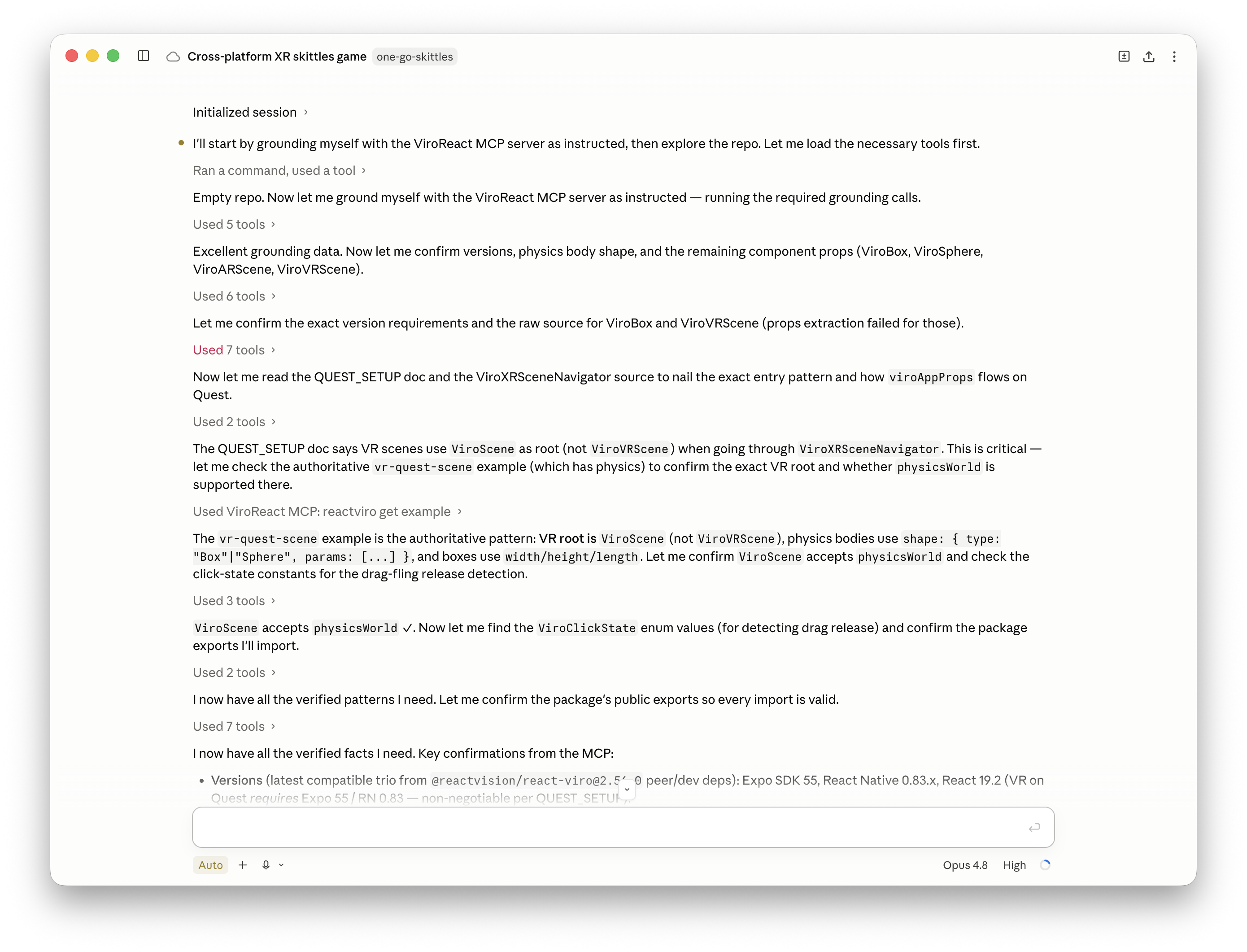
The ReactVision MCP Server connects Claude, Cursor, Codex, and any agent that speaks the Model Context Protocol to ViroReact, ReactVision Spatial, and the Editor. Your agent builds against the live APIs, generates the assets it needs, then runs and render-tests its own work before it reaches you.
// Add the ReactVision MCP Server, then sign in
// with your free ReactVision account.
"https://mcp.reactvision.xyz/viro"One server, the whole stack
The ReactVision MCP Server is a remote Model Context Protocol server that gives AI coding agents access to the whole ReactVision XR stack, with validation and render testing built in. Agents build better when the stack underneath them is one coherent thing. ReactVision builds every layer, from the renderer to the spatial infrastructure, so a single MCP connection gives your agent all of it, with one account and one set of credentials. New to the idea? Start with can AI agents build AR and VR apps?
ViroReact
The live, current API for the open-source renderer: every component, prop, event, doc, and working example, plus which features run on which device.
ReactVision Spatial
AI generation of 3D models and images for your project, and environment rendering that runs your scene inside recorded real-world rooms.
Editor
Two-way conversion between Editor scenes and ViroReact code, so your agent and the people working visually build on the same scenes.
Build: current knowledge, not stale guesses
Coding agents are trained once and fall behind fast. The MCP Server gives yours a live line to how the stack works today, and the tools to produce what a scene needs, so the code it writes matches the current library rather than an old snapshot of it.
Live ViroReact APIs, docs, and examples
The full component catalogue with prop schemas and event handlers, the docs, and real working scenes to learn from. Current today, not a training snapshot from last year.
Platform support checks
Check a feature against each platform and device before writing it, across iOS, Android, Meta Quest, and visionOS, so the agent knows what runs where.
AI 3D model and image generation
Generate the 3D models and images a scene needs in the same session the agent writes the code that loads them.
Editor scenes and code, both directions
Convert an Editor scene into a ViroReact TSX scene and back again, with a clear list of anything that could not make the trip.
8th Wall migration
Upload an 8th Wall project and convert it into a ViroReact scaffold the agent can validate, preview, and keep building on.
Moving off 8th Wall? Read how to convert an 8th Wall project with the MCP, or see asset generation in action.
Validate and test: your agent runs what it writes
Knowledge stops the guessing. The validation tools go further: your agent checks, runs, and render-tests the scenes it writes, so you review work that has already been tested instead of discovering the obvious failures yourself. Read the full story in the announcement post and testing XR in real rooms.
Scene execution
Run a scene in a real renderer and get back the frames that actually appeared. The agent can use the scene too: tap an object, wait for an animation, and capture the result.
Structural checks
Validate a scene against the real component APIs, so a misspelled prop or a component that does not exist is flagged immediately, not after a failed build.
Error diagnosis
Hand it an error, exception, or crash log and it explains what it actually means, instead of leaving the agent to guess at a fix from an opaque XR stack trace.
Performance budget checks
Read the scene's 3D models and flag the ones too heavy for the device you are targeting, before they turn into stutter someone else has to diagnose.
Render testing in real rooms
Render the scene inside real recorded environments, with no device needed. Record a room once, then test the same code across as many rooms as you like.
Visual regression
Compare two renders and report exactly what changed, so a refactor that quietly moves a model is caught straight away rather than in a bug report.
Connect the MCP Server in a minute
Point your agent at the server and sign in with a free ReactVision account to authenticate. No credit card required.
Create a free ReactVision account
Your agent authenticates with a ReactVision account. It is free to sign up and needs no card. Register here.
Add the server to your agent
Add the server URL as an MCP server in your agent of choice, then sign in and pick the team you want to use. On Claude, add it from the Connectors Directory in one click.https://mcp.reactvision.xyz/viro
Ask for something real
Ask for a scene, a feature, or a fix. Your agent builds against the live stack, runs and checks the result, and hands you work that has already been tested. Guides for every agent live in the docs.
Credits and plans
Connecting your agent is free. MCP usage, including AI generation of 3D models and images, draws on your plan's AI credits, the same credits that cover the Editor's AI agent. Paid plans also get higher usage limits.
Enough to connect, build, and generate your first assets.
Plus environment testing and higher usage limits.
For teams whose agents generate and test every day.
Need more? Buy credit packs, upgrade, or compare plans. Running agents inside a secure network? The MCP Server can run in your environment too, see ReactVision for defence.
See the setup
A short walkthrough of getting the MCP Server running in your agent.
MCP Server questions, answered
What is the ReactVision MCP Server?
How do I set up the ReactVision MCP Server?
Which coding agents work with the ReactVision MCP Server?
Is the ReactVision MCP Server free?
Can the ReactVision MCP Server run and test the scenes my agent writes?
Why use the ReactVision MCP Server instead of the documentation?
Can the ReactVision MCP Server migrate an 8th Wall project?
Give your agent the whole stack
Connect the server, sign in with a free ReactVision account, and start shipping AR and VR your agent has already tested.
Support
Community
Have a quick question or need feedback? Jump into our Discord for real-time chat, or post on r/ReactVision to get answers, code samples, and tips from thousands of fellow builders.
ReactVision Partners
Need deeper help? Engage a trusted ViroReact Partner. Certified agencies and consultants can architect, build, or optimise your XR app, run performance audits, and guide store launches so you ship faster with confidence.