What’s New in ViroReact 2.54.0: Semantic Masking, Animated 3D Models, and Critical Fixes
ViroReact 2.54.0 is here, and it is one of our most exciting updates yet. This release brings a brand new rendering capability that lets your virtual objects respond to the real world, full animation support for gltf/glb 3D models, smoother permission handling, Expo 55 compatibility, and a batch of critical bug fixes that make the whole experience more stable across both platforms.
Let me walk you through everything that is new.
Your AR Content Can Now See the Real World
This is the feature I am most excited about in 2.54.0: semantic masking.
Until now, your virtual objects existed in their own layer, completely unaware of what was actually in the camera feed behind them. A floating hologram would render the same way whether it was in front of a person, the sky, or a building. That changes with semantic masking.
You can now configure materials to appear only on specific types of real-world surfaces. Want a cloud effect that only renders on the sky? Done. Want to hide a character wherever a person is standing? You can do that too. The system recognises eleven real-world categories: sky, building, tree, road, sidewalk, terrain, structure, object, vehicle, person, and water.
This works on both Android and iOS. If you are on iOS, you will need to make sure the ARCore Semantics pod is included. The easiest way is to add includeSemantics: true under ios in your Expo plugin config in app.json. If you are already using provider: “arcore” or includeARCore: true, you are already set.
The creative possibilities here are huge. Think real-world-aware visual effects, AR experiences that blend more naturally with the environment, or games where virtual characters interact with the physical space around them.
Animated 3D Models in GLB and glTF
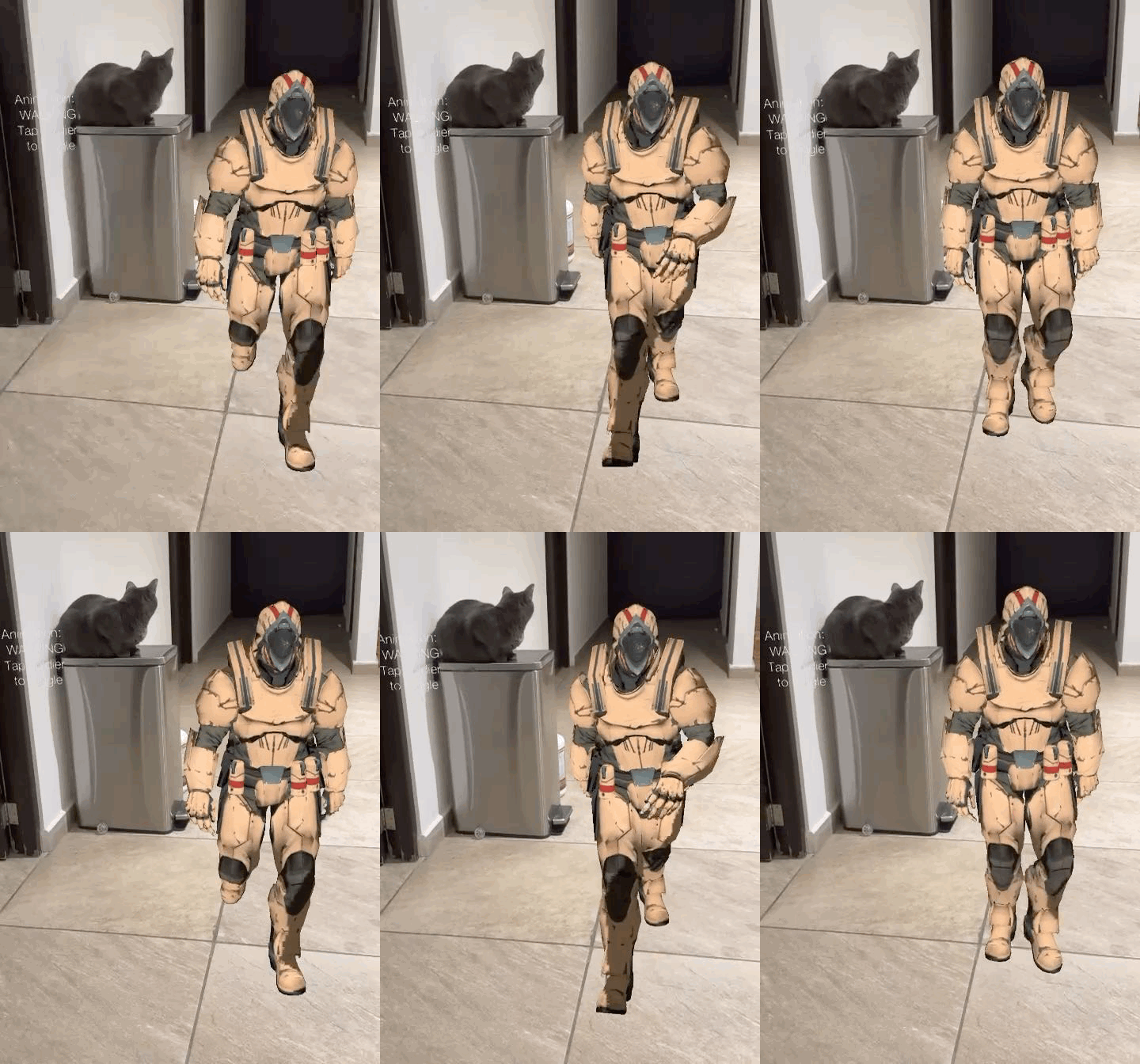
ViroReact has supported animated 3D models in VRX format for a while, but one of our most requested features has been support for GLB and glTF animations. With 2.54.0, that support is here.
Animated GLB and glTF models with embedded animations now play correctly out of the box. This covers the three main animation systems that 3D artists use: skeletal rigs for character movement, morph targets for facial expressions, blend shapes, and skinning for soft-body deformation. No extra configuration needed. If the animation is embedded in the file, ViroReact picks it up and plays it automatically.
This is a big deal because GLB and glTF are the most widely used 3D formats across the industry. Most asset libraries, 3D modelling tools, and AI generation pipelines export to glTF by default, so this update means you can now bring animated assets into your AR scenes from virtually any source without needing to convert them first.
Simpler Permission Handling
Dealing with camera and location permissions is one of those things that is never fun to wire up manually. 2.54.0 introduces two new utility functions that make it much easier:
requestRequiredPermissions(permissions?) prompts the user for the permissions you specify. You can pass a list of exactly what you need, like “camera” and “location”, or call it with no arguments to request all four supported permissions (camera, microphone, storage, and location) at once.
checkPermissions(permissions?) lets you read the current permission status without prompting the user. This is useful for checking what has already been granted before deciding whether to ask.
These are small additions, but they remove a common friction point when setting up new AR projects.
Expo 54 and 55 Support
ViroReact 2.54.0 is now compatible with both Expo SDK 54 and Expo SDK 55. If you have been holding off on upgrading your Expo version, you can now move forward without worrying about ViroReact compatibility.
Critical Bug Fixes
This release also addresses several significant bugs that were affecting stability on both platforms.
Android
Crash on launch (Android 15 and 16): Apps were crashing immediately on devices running Android 15 or 16 due to a new 16 KB memory page-size requirement from Google. All native libraries have been rebuilt to comply with the new standard. If you had users on newer Android devices reporting instant crashes, this is the fix.
Crash after returning from background: A combination of three separate issues caused a guaranteed crash whenever the OS suspended the app and reclaimed GPU memory. On resume, the app tried to use GPU resources that no longer existed. All three root causes have been fixed, and the app now recovers cleanly.
Image marker detection not firing: The onAnchorFound callback on ViroARImageMarker was never being called on Android, which meant image detection events were silently failing. The native event bridge has been corrected.
Texture overlay during video recording: When recording AR scenes, the 3D model’s texture was being rendered over the entire screen instead of just the model itself. This was caused by a stale GPU state cache when switching between display and recording contexts. Fixed.iOS
Portal scene interior not rendering: Looking through a ViroPortalScene was showing only the camera feed with none of the 3D content inside the portal visible. A leftover GPU stencil state from the previous frame was preventing interior content from rendering. Fixed.
EAS cloud build failure: iOS builds through Expo Application Services were failing with a CocoaPods syntax error in the generated Podfile. The Expo plugin now generates a valid Podfile in all build environments.
Get Started
Update to ViroReact 2.54.0 and start building. If you are new to ViroReact, the best place to begin is our starter kit or the documentation.
Also, in case you missed it, see how to use Studio’s AI-powered asset creation tools to generate the 3D assets you need for your projects, check out our recent tutorial:
Make sure you never miss a ReactVision update and get access to exclusive Studio discounts by signing up to our newsletter:
Follow us on X for the latest news:
Join the community on Discord:
Happy building!
Get the ReactVision newsletter
Product announcements, including ViroReact, ReactVision Spatial, Editor and MCP updates, direct to your inbox. No spam, and you can unsubscribe at any time.