Loop Engineering for AR and VR: Let Your AI Agent Test Your App in Real Rooms
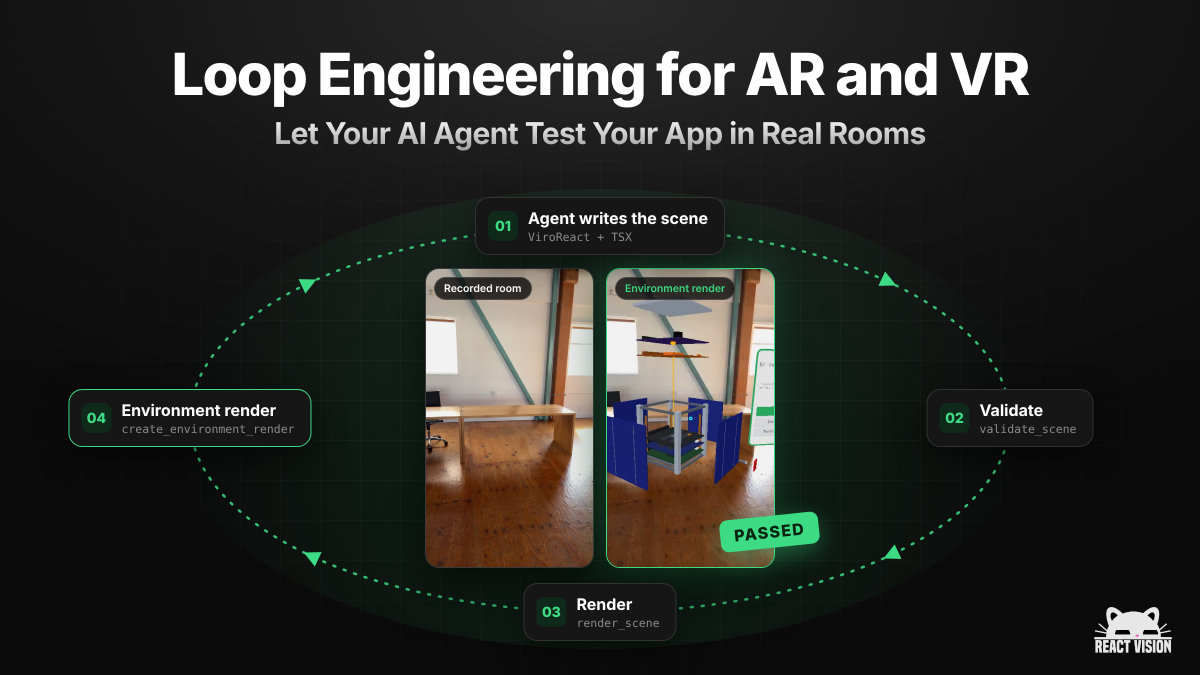
Your coding agent can write an AR scene in a couple of minutes. Finding out whether that scene actually works still means picking up a phone or headset, walking into the right room and looking. For a lot of teams, that last step is where the speed of agentic coding quietly disappears.
Environment testing fixes that. Record a real space once, and from then on your AI agent can drop its scene into that recording, see what happens and fix what it finds, without anyone standing in the room. This post covers what it is, why it matters, and how to get it running in a few minutes.
The loop is the product
A lot of the progress in agentic coding over the last year has come from better loops, not just better models.
An agentic coding loop is simple: the agent writes something, checks it, learns from the result and goes again. The more of that loop the agent can run on its own, the less you have to babysit it and the more you can trust what lands in your pull request. Designing that loop on purpose, giving the agent the right checks and the right feedback, is what people have started calling loop engineering.
On the web and mobile, loop engineering is mostly solved. Agents run the test suite, open a headless browser, take a screenshot and compare. The feedback is fast and the agent can act on it.
AR and VR have been the awkward exception. The thing you actually need to test is how your content behaves in the physical world. Does the model sit on the table? Is it the right size for the room? Does it stay put when the user walks around it? No unit test answers that. Until now, the only real check was a person holding a device, which means the loop breaks at exactly the point where it matters most.
What environment testing is
An environment is a recording of a real space: a living room, a warehouse floor, a shop, a classroom. You capture it once with the StudioGo app on your phone, and it is stored against your team on ReactVision Platform, ready to reuse as often as you like.
When your agent wants to test its work, it asks the ViroReact MCP Server to render the scene inside that recording. We take the code from your project, run it through the ViroReact renderer on our side, replay the recorded session as if a phone were really there, and hand back a video of your content in the room, along with diagnostics if anything went wrong.
In other words, your agent sees what your user would see, with no device and no trip.
Why it changes how you build AR and VR
Your agent can close its own loop. It writes the scene, validates it, renders it in a real room, looks at the result and fixes what is off. By the time something reaches you, it has already been tested in the place it was built for.
You stop travelling to test. If you are building for one specific space (a client's showroom, a factory floor, a museum gallery), record it once and build against it from anywhere. Save the site visit for the questions a recording cannot answer.
One scene, many rooms. Keep as many environments as you like and run the same scene through all of them. A small flat, an open-plan office and a dim warehouse will each surface different problems.
It catches the bugs that only show up in the real world. The classic one is content that looks fine in a preview but is pinned to the camera instead of the floor, so it follows the user around the room. That is invisible in a screenshot and obvious in an environment render. Your agent spots it and fixes it before you ever see it.
Reviews get easier. Every render produces a video you can drop into a pull request or send to a client. Nobody has to install a build to see where things landed.
How to set it up
1. Connect your agent to the ViroReact MCP Server
Add https://mcp.reactvision.xyz/viro as an MCP server in Claude Code, Cursor, Codex, Windsurf or whichever agent you use, then sign in with your ReactVision Studio account. The setup docs walk through each agent. Environment testing is available on the Basic plan and above.
2. Record your space in StudioGo
Open StudioGo on your phone, choose your team and project, and record the room you want to test in. Move steadily and cover the surfaces your content needs, such as the floor, a table or a wall. When you finish, the environment is saved to your project and your agent can use it straight away.
3. Ask your agent to test
That is the setup done. From here you just talk to your agent in your IDE:
"Render my AR scene in the warehouse environment and tell me whether the product model sits on the floor."
"Check the living room recording is good enough to test in, then render my scene inside it."
"Run this scene in all three of our environments and flag anything that looks wrong."
Your agent picks the right tools, renders the scene, reviews the video and diagnostics, and iterates. You review the outcome.
If your content lives in ReactVision Studio rather than in code, you can do the same thing from the Studio UI. See environment rendering in Studio.
What a good loop looks like
Put together, the loop for an AR feature looks something like this:
- You describe the feature.
- Your agent writes the ViroReact code using live knowledge from the MCP server.
- It validates the scene against the real component APIs and fixes any errors.
- It renders the scene in your recorded environment and checks the result.
- It fixes what is off and renders again until it is right.
- You review a working scene and a video of it in the room.
Steps two to five happen without you. That is loop engineering for AR and VR development: your job moves from testing every change by hand to deciding what good looks like.
Where a recording stops
A recording is a very close stand-in for the room, not the room itself. If the lighting changes completely, the furniture moves, or you need to feel the experience on your own head in a headset, you still want a device in hand for the final check. Environment testing turns that check into the last step instead of every step.
Try it
Connect the MCP server, record one room, and ask your agent to render your scene in it. It takes a few minutes, and it changes how much you can hand over to your agent. And if you get stuck or want a second pair of eyes on a recording, come and find us on Discord.